You walk. You talk. AI builds the estimate.
Site Walk turns your voice into a finished, priced, signed scope of work — while you're still on the property. Narrate what you see. Snap the nameplate. Ask questions out loud. Smart Scope extracts the data, researches the equipment, prices the parts, and writes the whole thing. This is a real site walk in Dublin, Ohio: door to $6,431.75 estimate in 23 minutes.
✓ Free 45-day trial
✓ No credit card required
✓ Works hands-free with Meta Glasses
Listening · Every word becomes the estimate
$6,431.75
Scope total, signed
One walk · 9:29 AM to 9:52 AM
Twenty moments. One conversation. Zero paperwork.
Every screen below is from a single real site walk at 495 Metro Place South — timestamped, GPS-stamped, and narrated out loud. Watch a voice memo turn into equipment research, live parts pricing, gauge readings, LiDAR measurements, and a finished estimate with the profit margin already dialed in.
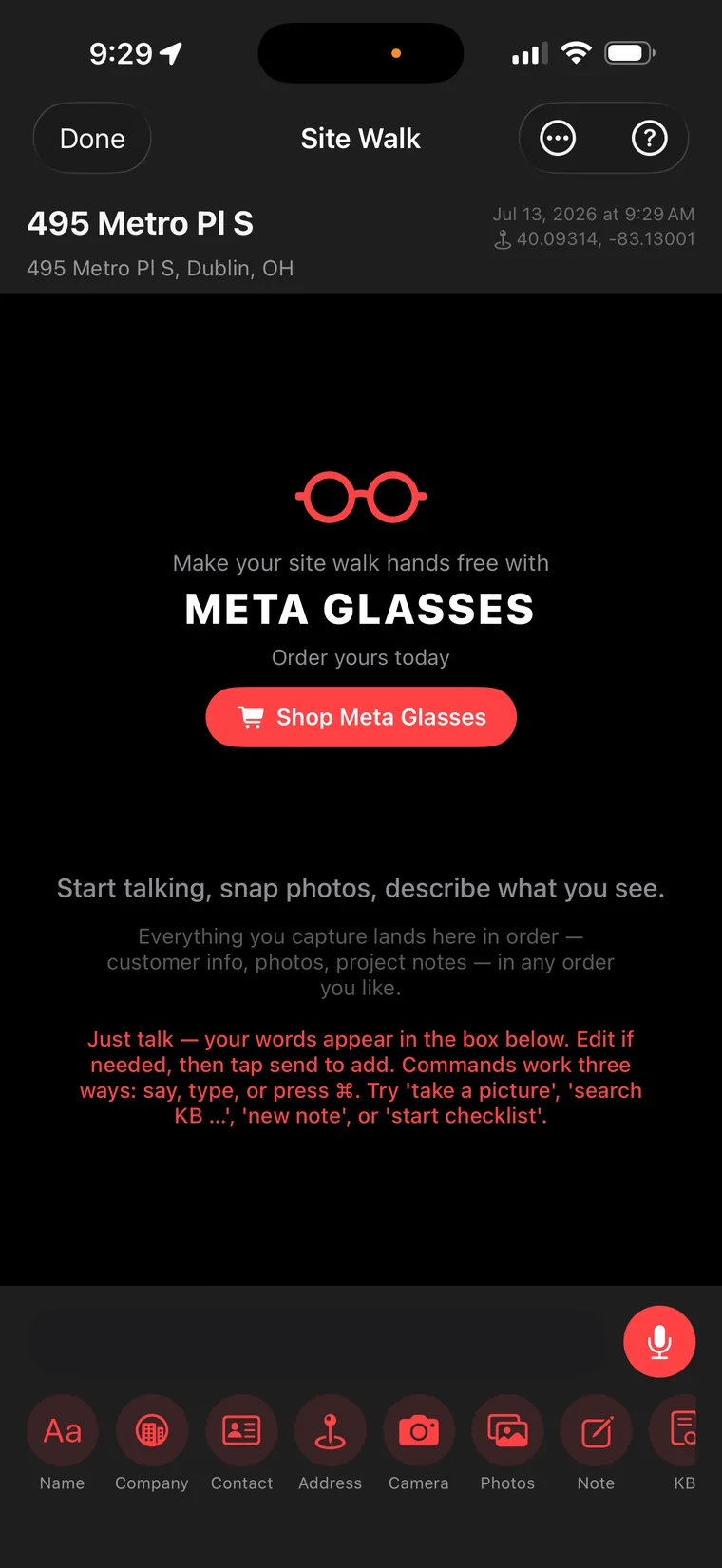
Open Site Walk. Just start describing the job.
"Start talking, snap photos, describe what you see." That's the whole instruction manual. Everything you capture lands in order — customer info, photos, project notes — and every command works three ways: say it, type it, or press it. Try "take a picture," "search KB," "new note," or "start checklist." Pair a set of Meta Glasses and it's completely hands-free — your eyes are the camera, your voice is the keyboard, and the ladder stays under both hands.
Voice-first · Meta Glasses ready
1
Step 02 · Speak the customerinto existence
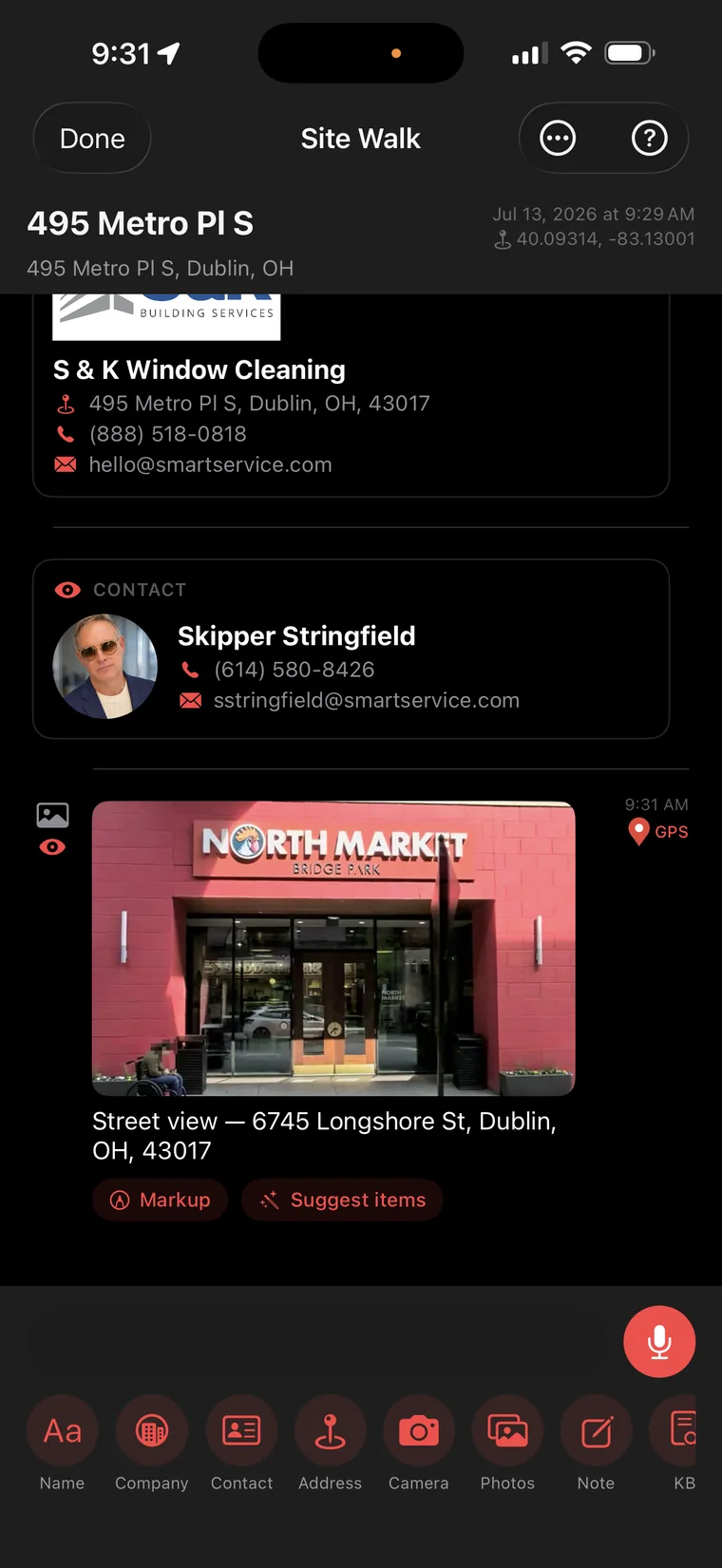
Company. Contact. Street view. Spoken, not typed.
Name the company out loud and Site Walk builds the card: S & K Window Cleaning, address, phone, email. Add the contact — photo included. Snap the storefront and it's captioned and dropped into the timeline, GPS-stamped at 9:31 AM. Notice the buttons under that photo: Markup and Suggest items — the AI will look at your own photo and propose line items from it. The file is building itself while you shake hands.
GPS + time on every entry
2
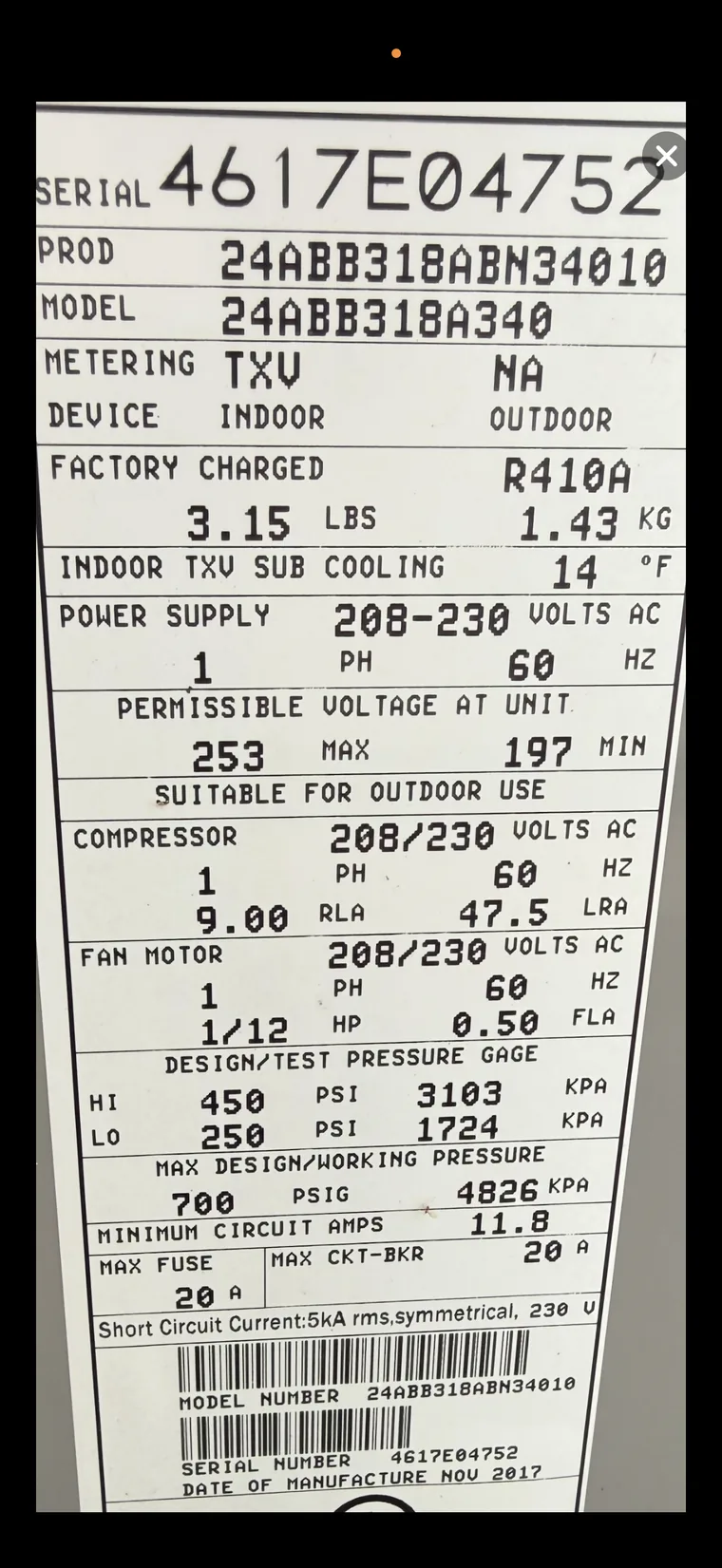
Point the camera at the nameplate. That's it.
One photo of the Carrier data plate — the same faded sticker every tech has squinted at ten thousand times. Serial, model, refrigerant charge, RLA, LRA, design pressures, breaker sizing. You've been transcribing these onto clipboards your whole career. You just did it for the last time.
One photo in the wild
3
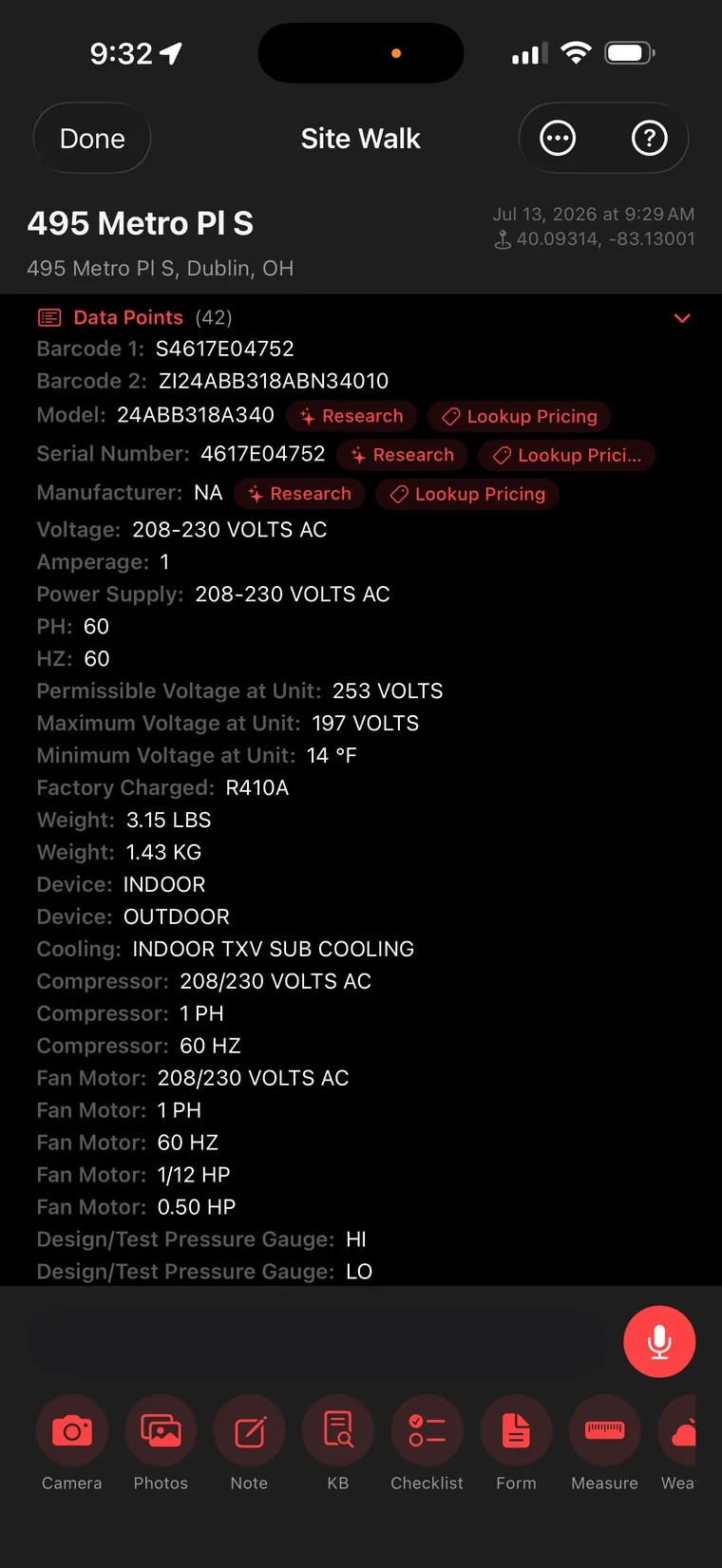
One photo becomes 42 structured data points.
Site Walk reads the plate like a machine — because it is one. Both barcodes. Model. Serial. Voltage, phase, hertz. Permissible voltage range. Factory charge. Compressor RLA. Fan motor HP. Forty-two fields, every one captured and labeled. And look closer: the model and serial each carry two live buttons — Research and Lookup Pricing. The data isn't just stored. It's loaded.
42 fields · zero typing
4
Phase 03 AI Does the Homework
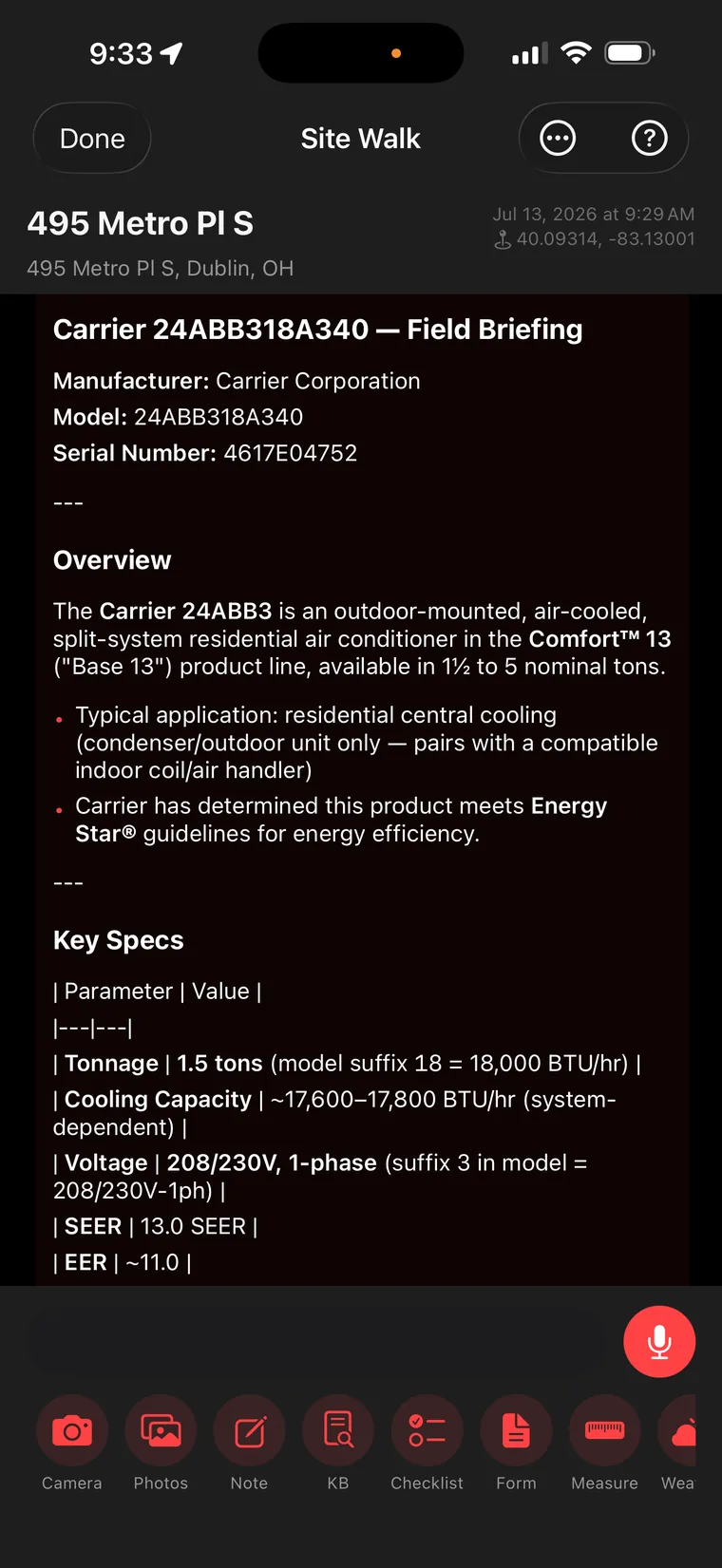
Get a full field briefing on the exact unit.
One tap on Research and the AI returns a briefing a senior tech would be proud of: the Carrier 24ABB3 is a Comfort™ 13 split-system condenser, 1.5 tons, 13 SEER, Energy Star rated, 208/230V single-phase. Application notes, pairing requirements, key specs in a clean table. You now know this unit better than the guy who installed it.
Instant equipment intelligence
5
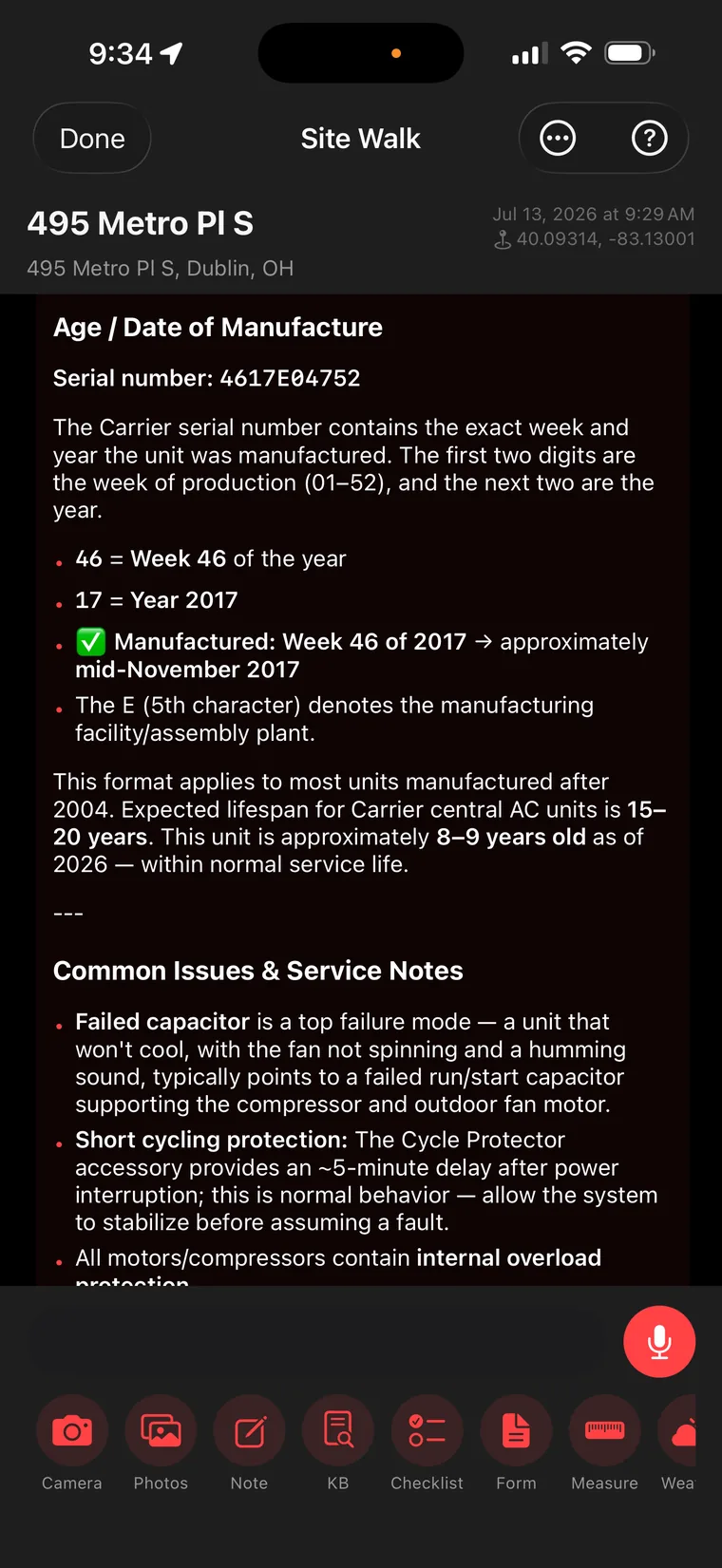
It decodes the serial number like a factory rep.
Serial 4617E04752? The AI breaks it apart: week 46, year 2017 — built mid-November 2017, with the fifth character identifying the assembly plant. Then it does the math against the 15–20 year Carrier lifespan and calls it: within normal service life. It even lists the unit's known failure modes — failed run capacitor at the top — which is about to matter a lot on this job.
Serial decoded · lifespan calculated
6
Step 07 · Receipts included
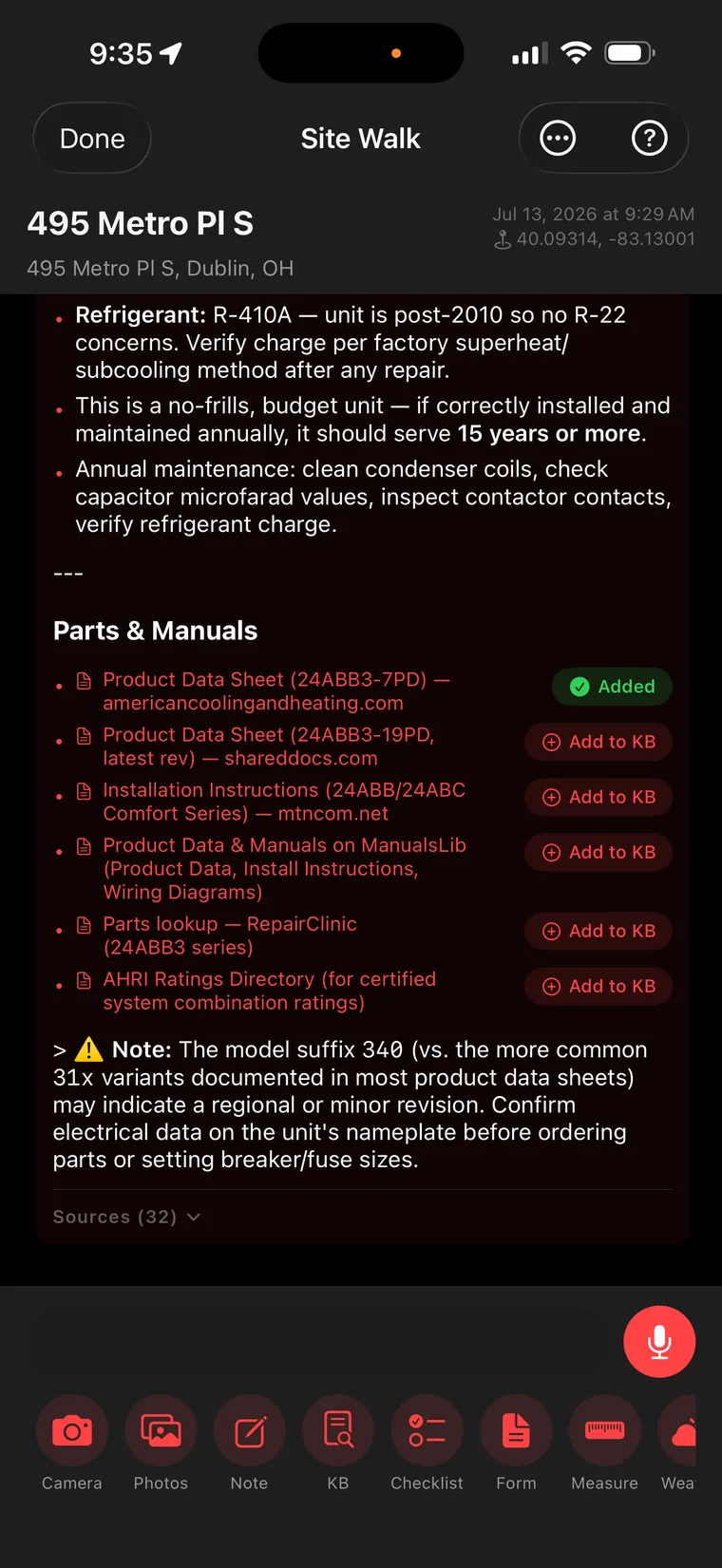
32 sources. Manuals found. One tap into your KB.
The research isn't hand-waving — it cites 32 sources and surfaces the actual documents: product data sheets, installation instructions, wiring diagrams, parts lookups, AHRI ratings. Each one has an Add to KB button; the first data sheet is already marked ✓ Added. And notice the integrity: it flags that this unit's 340 suffix differs from the common variants and tells you to confirm nameplate data before ordering parts. An AI that says "double-check me" is an AI you can take to a customer.
Cited · sourced · KB-ready
7
Step 08 · Show me the money
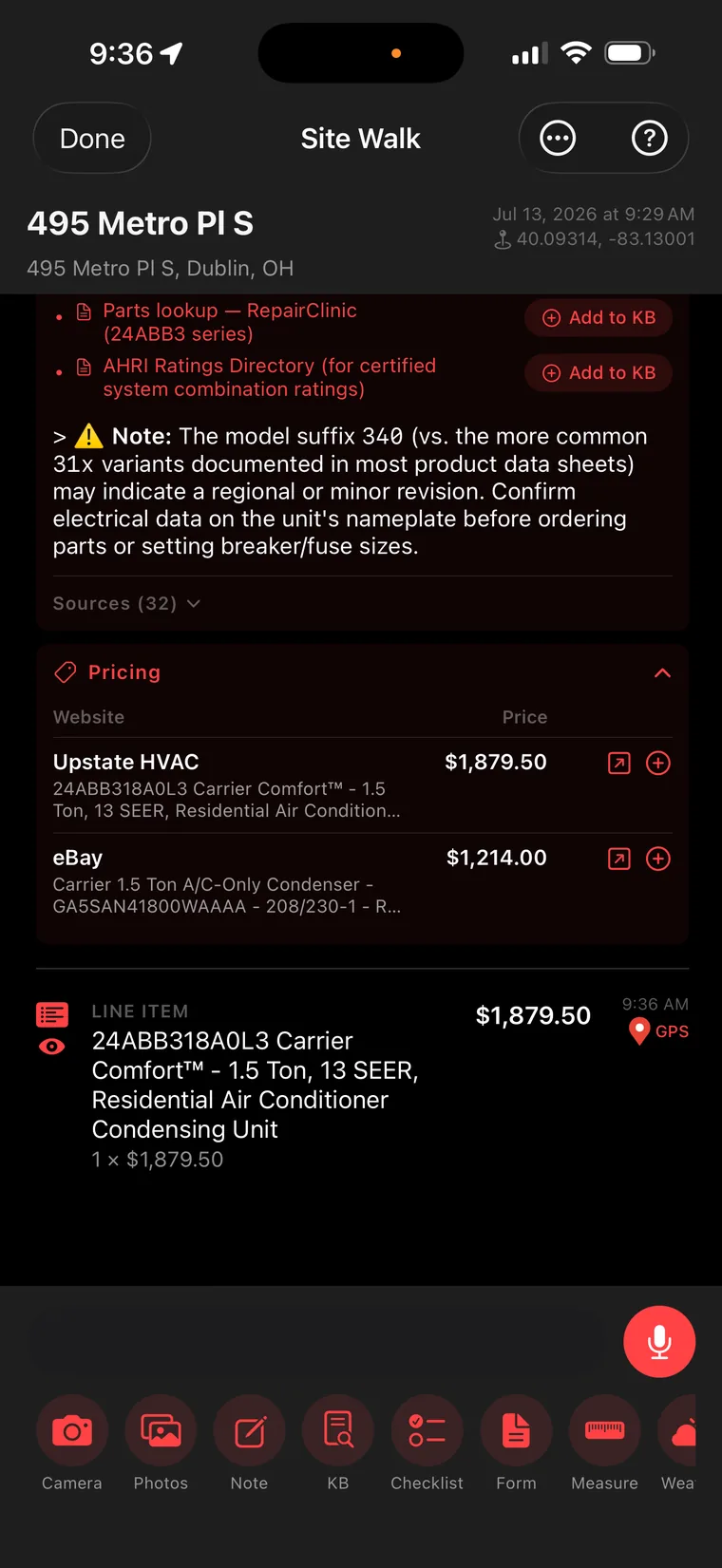
Live pricing — that becomes a line item in one tap.
Lookup Pricing pulls real numbers from real sellers: $1,879.50 at Upstate HVAC for the matching Carrier Comfort™ condenser, $1,214.00 for a comparable on eBay. Tap the ⊕ next to the price you want and — look at the bottom of the screen — it's already a line item on the estimate, GPS-stamped at 9:36 AM. Replacement option priced before you've closed the service panel.
Real-time pricing → line item
8
Step 09 · Your library, on the truck
The KB holds the actual factory documents.
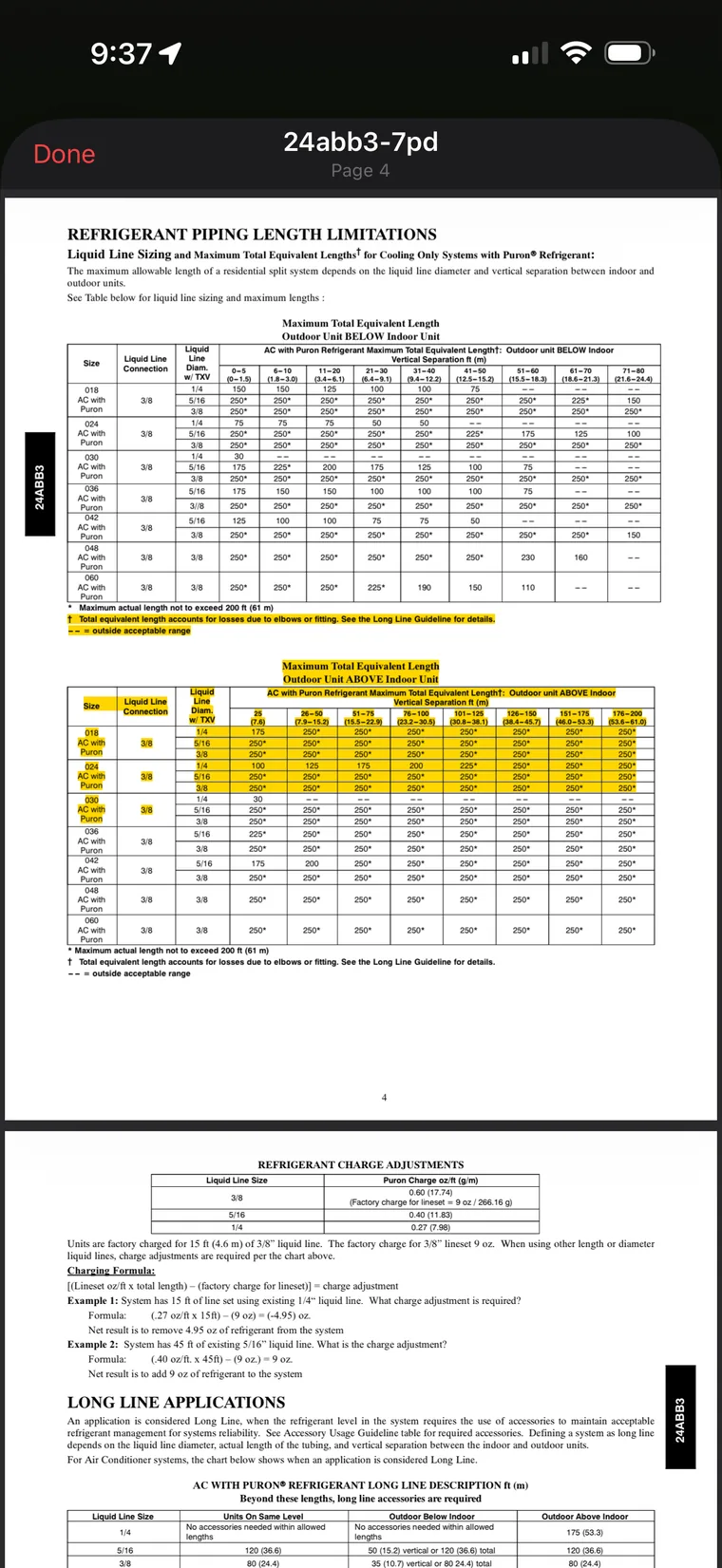
That spec sheet you added? It's the real thing — here's page 4 of the Carrier 24ABB3 product data, refrigerant piping length limitations, charge adjustment formulas and all, with the relevant tables highlighted. Your Knowledge Base isn't a pile of PDFs on some office server. It's a searchable brain that rides in your pocket.
Factory docs · highlighted & indexed
9
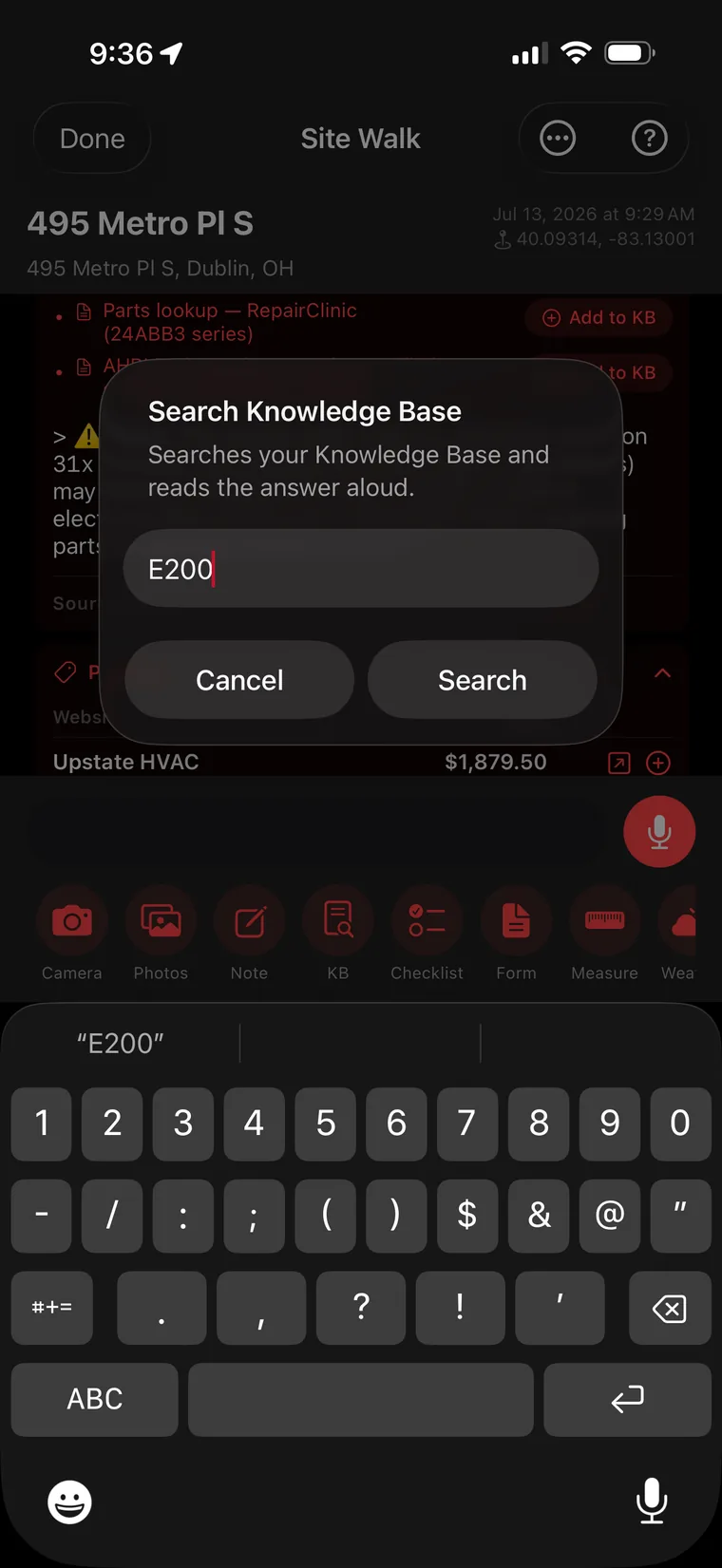
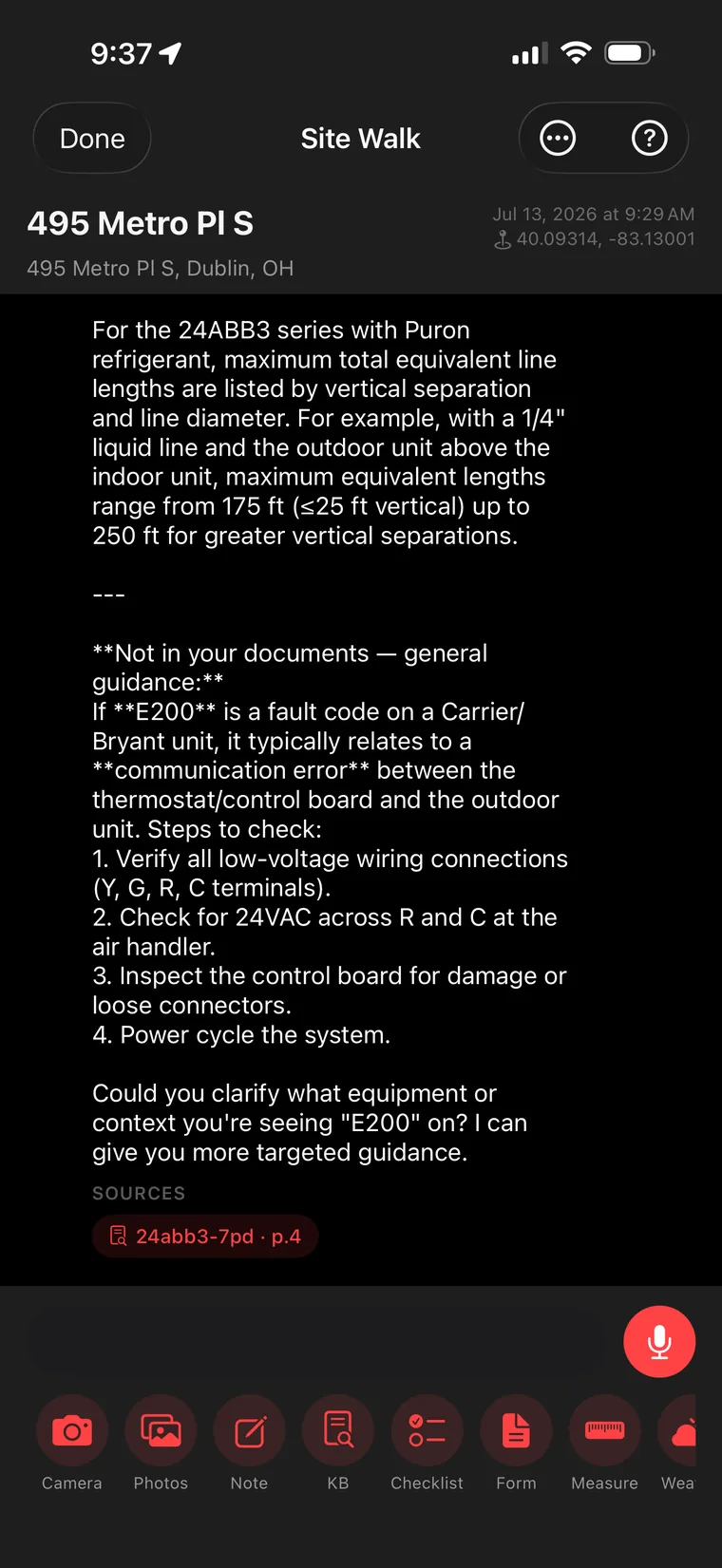
Stuck on a fault code? Say "search KB… E200."
No scrolling, no flipping pages with greasy gloves. Speak or type the question and Site Walk searches your Knowledge Base and reads the answer aloud — hands on the gauges, eyes on the unit. It's like having the senior tech who's memorized every manual standing next to you. Except this one never retires.
Ask by voice · answered aloud
10
Step 11 · Cited, not guessed
Answers with page numbers — and honest limits.
The answer comes back citing the exact source: 24abb3-7pd, page 4 — your own document. And when the E200 question goes beyond what's in your KB, it says so plainly — "Not in your documents — general guidance" — gives a sensible 4-step diagnostic, then asks a clarifying question. That's the difference between an AI parlor trick and a tool a professional can stake a job on.
Source-cited · knows its limits
11
Phase 05 Inspect Like a Pro
Step 12 · The walkthrough
Checklists at walking speed.
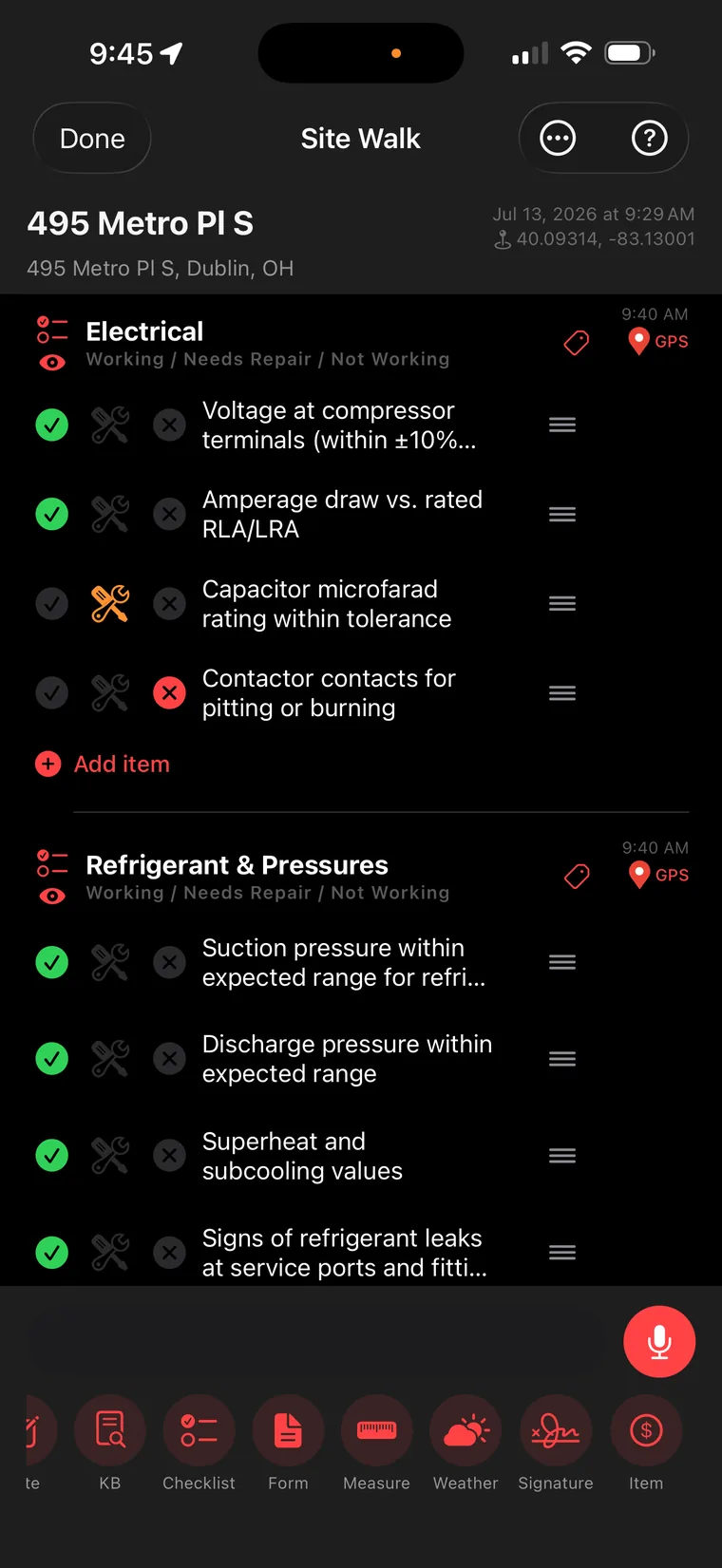
Electrical. Refrigerant & Pressures. Every item a three-state tap: Working / Needs Repair / Not Working. Voltage — good. Amperage draw — good. Capacitor microfarad rating — flagged. Contactor contacts — failed, pitted and burned. Each section GPS-and-time-stamped as you move. The deficiencies you just tapped are about to become the repairs you get paid for.
Tap · tap · flagged
12
Step 13 · Forms that feel like gauges
Readings captured the way a tech thinks.
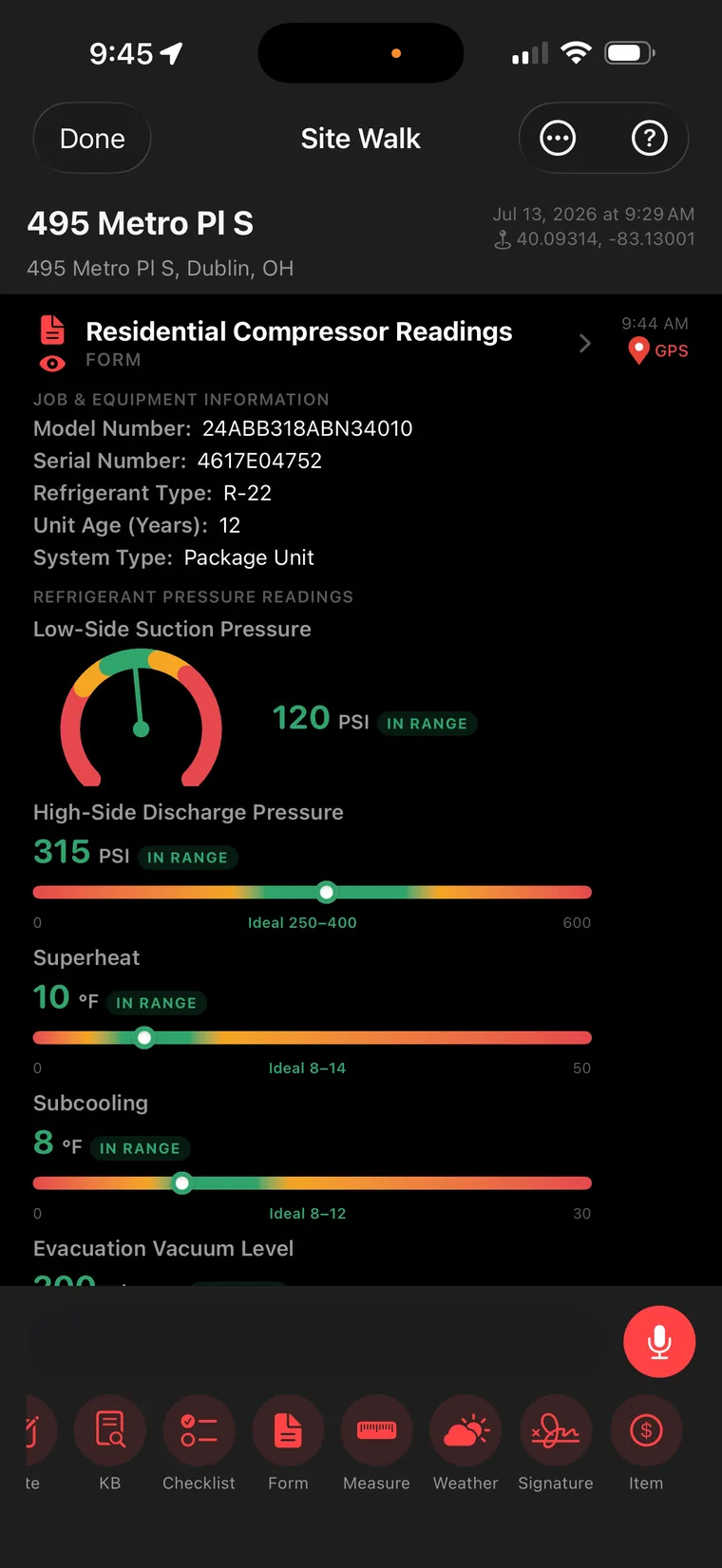
The Residential Compressor Readings form doesn't look like paperwork — it looks like your manifold. Suction 120 PSI. Discharge 315 PSI. Superheat 10°F. Subcooling 8°F. Every reading lands on a color-banded gauge with an IN RANGE badge and the ideal window printed right on the scale. Model and serial pre-filled from the nameplate scan, obviously. You measure; it documents.
Gauge-style capture · auto-filled
13
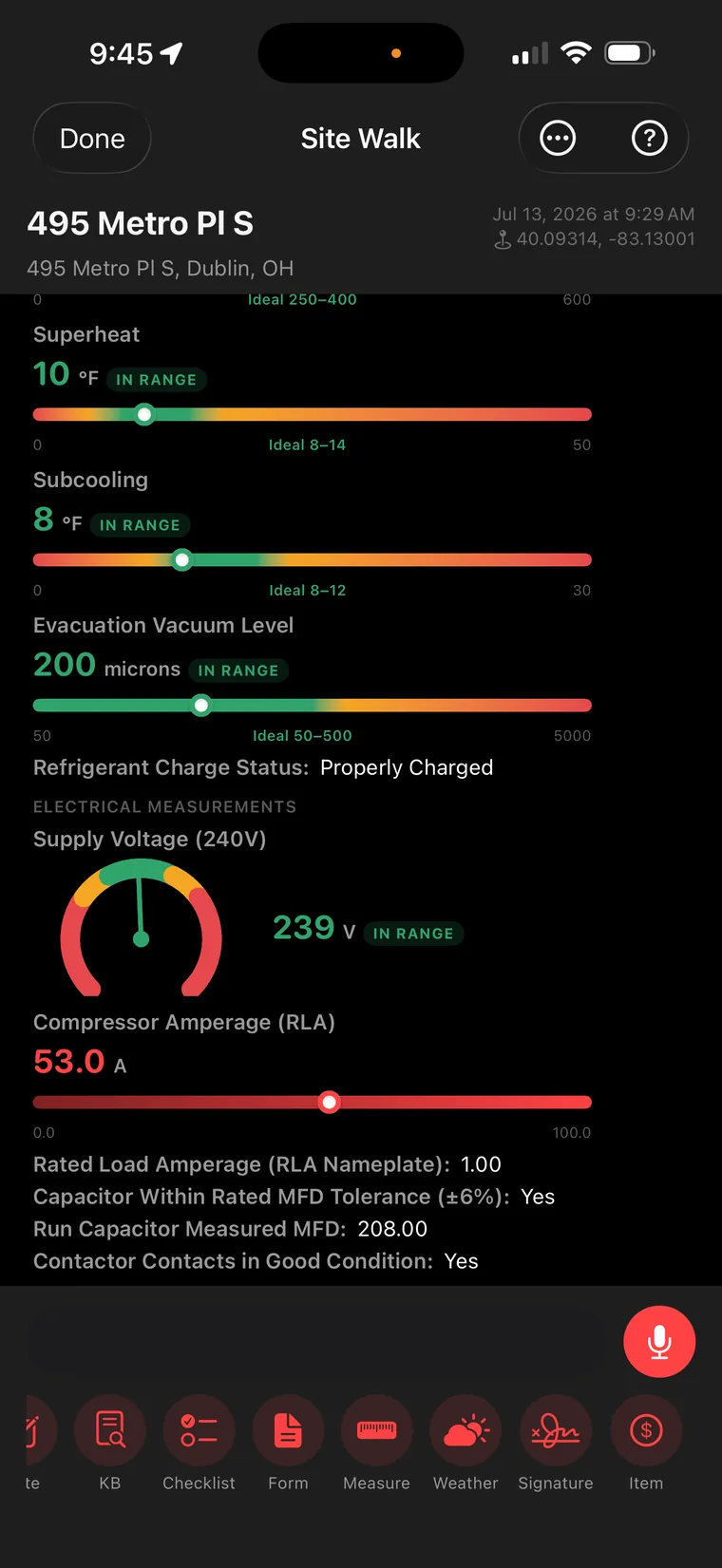
And when something's wrong, it glows red.
Vacuum pulled to 200 microns — in range. Supply voltage 239V — in range. Then the needle you can't unsee: compressor amperage 53.0A, burning red on the slider. Capacitor MFD measured, contactor condition logged. The evidence for every line item on this estimate is being captured in real time — in color, with timestamps, at the unit. Try arguing with that.
Red means revenue
14
Phase 06 Measure Everything
Step 15 · Point the phone at the room
LiDAR-scan the space. Floor, walls, ceiling — done.
Walk the room with your phone and Site Walk hands back a 3D model: floor 645 sq ft · walls 677 sq ft · ceiling 9'2". No tape measure, no sketchpad, no "I'll swing back by to measure." And right below the scan: Add as line items. Square footage to sellable scope in one tap.
3D scan → line items
15
Step 16 · Measure from orbit
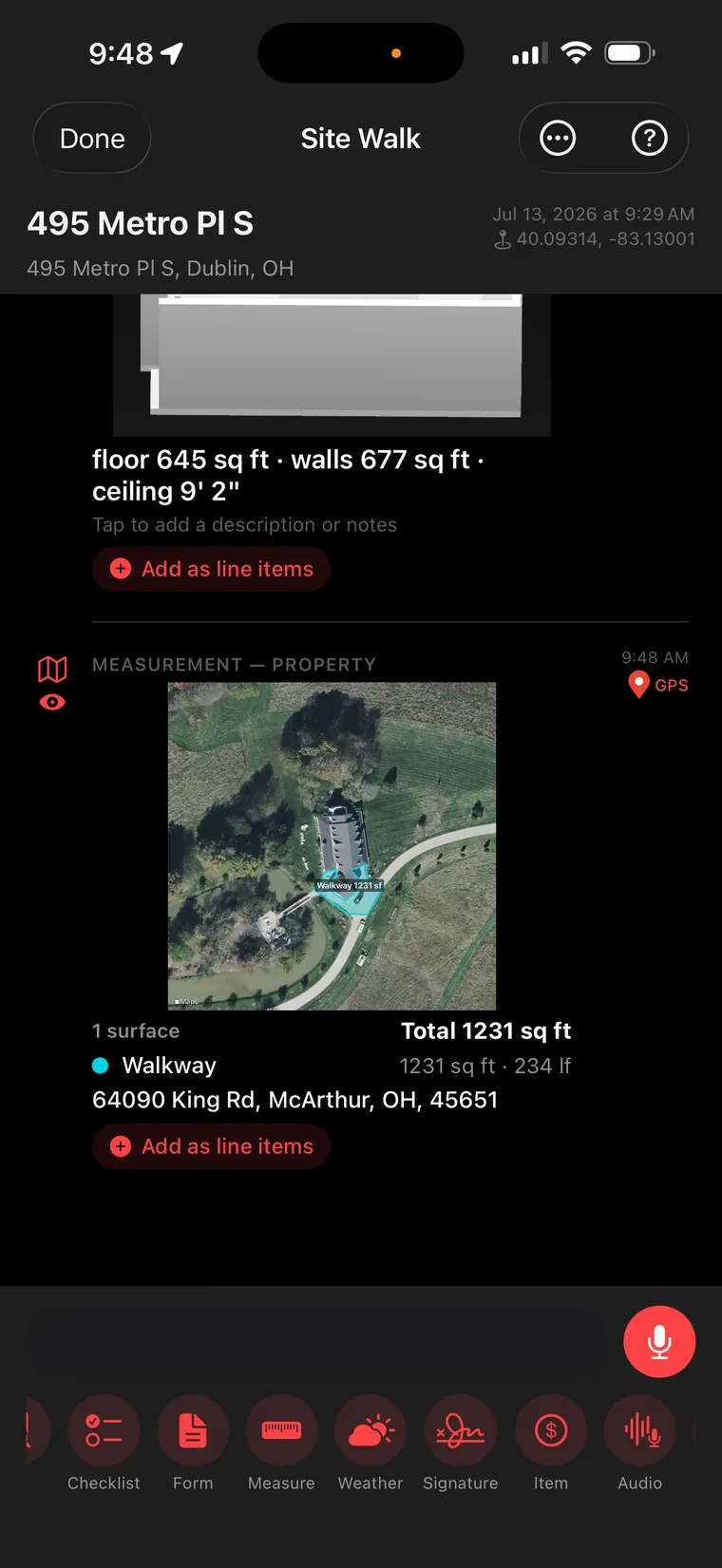
Trace any surface on the property — from a satellite.
Outdoor work? Don't pace it off. Trace the surface on aerial imagery and Site Walk computes it: Walkway — 1,231 sq ft, 234 linear feet, address attached. Driveways, roofs, lots, walkways — measured from your thumb, added to the estimate with the same one tap. Your competition is still out there with a measuring wheel.
Satellite takeoffs · 1 tap to scope
16
Step 17 · Airtight documentation
Weather-stamped. Signed. Bulletproof.
One tap logs the conditions — Clear, 76°F feels like 81°, wind 4 mph NE, 75% humidity — because six months from now, "what was it like that day?" shouldn't be a memory test. Then the customer signs right on the screen, right at the site, GPS-stamped at 9:49 AM. Twenty minutes in, and you have documentation most contractors couldn't assemble in a week.
Conditions + signature · on the spot
17
Step 18 · The magic trick
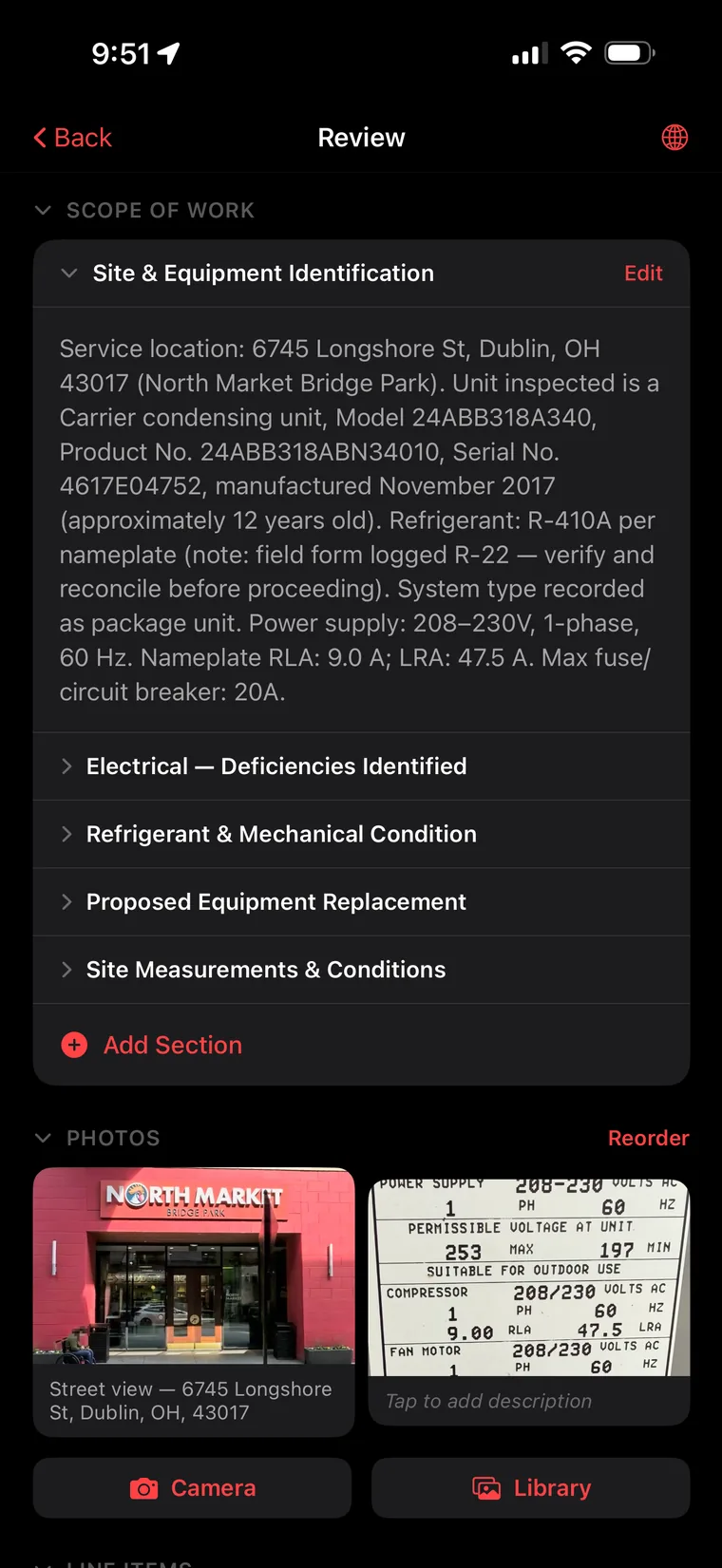
AI writes the scope of work. Actually writes it.
Tap Done and everything you said, snapped, measured, and tapped becomes prose: Site & Equipment Identification. Electrical — Deficiencies Identified. Refrigerant & Mechanical Condition. Proposed Equipment Replacement. Site Measurements & Conditions. Read that first section — model, serial, manufacture date, electrical specs — and catch the detail: it noticed the field form said R-22 while the nameplate says R-410A, and flagged it for reconciliation. The AI proofreads the job. Photos come through auto-captioned.
Narration → professional scope
18
Step 19 · Findings → invoice lines
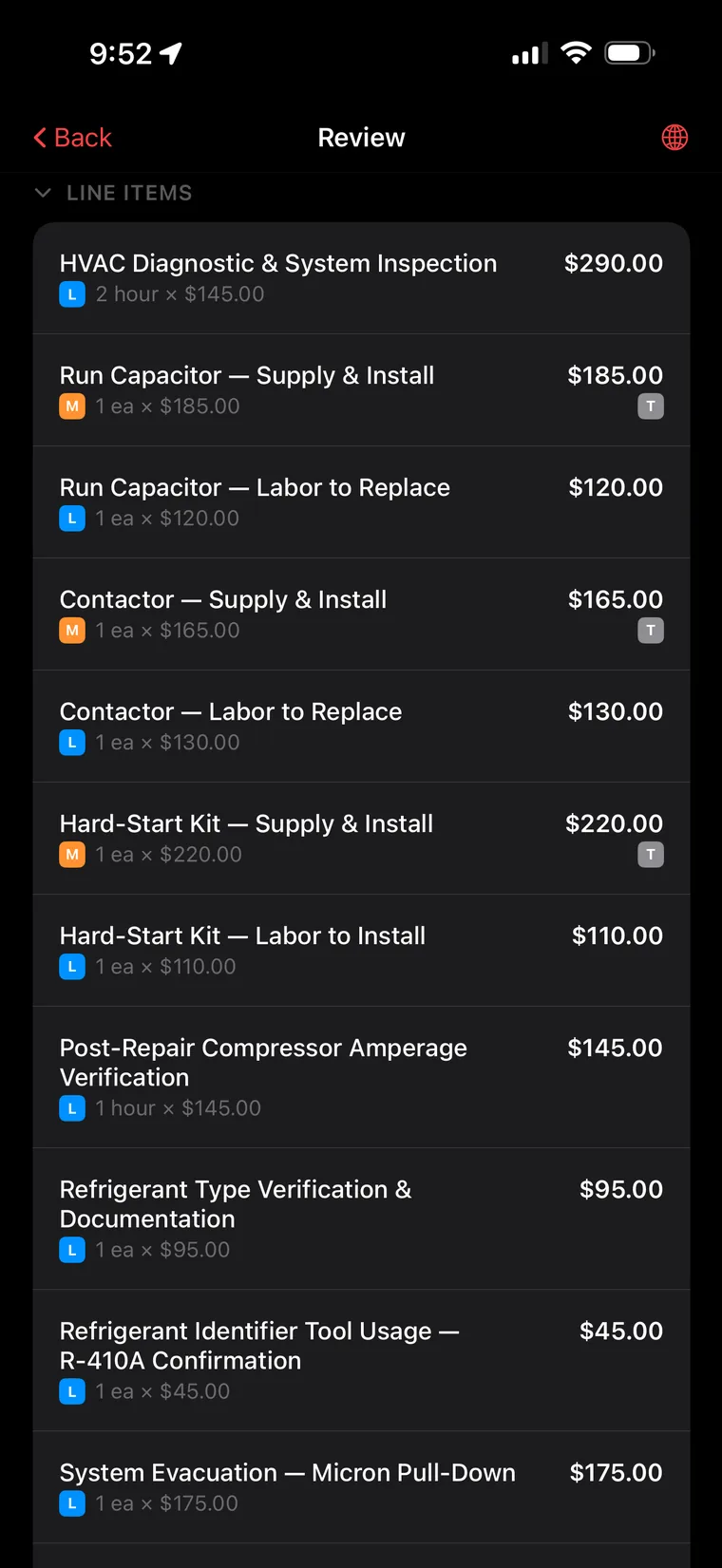
Every deficiency became a priced line item.
Remember the flagged capacitor and the burned contactor from Step 12? Here they are, costed: diagnostic 2 hrs @ $145. Run capacitor — supply & install, $185, plus labor. Contactor, $165, plus labor. Hard-start kit. Post-repair amp verification. Refrigerant verification. Micron pull-down. Materials and labor tagged and taxable-flagged. Nothing you found on the walk leaks out of the estimate — and nothing you do goes unbilled.
Findings, fully monetized
19
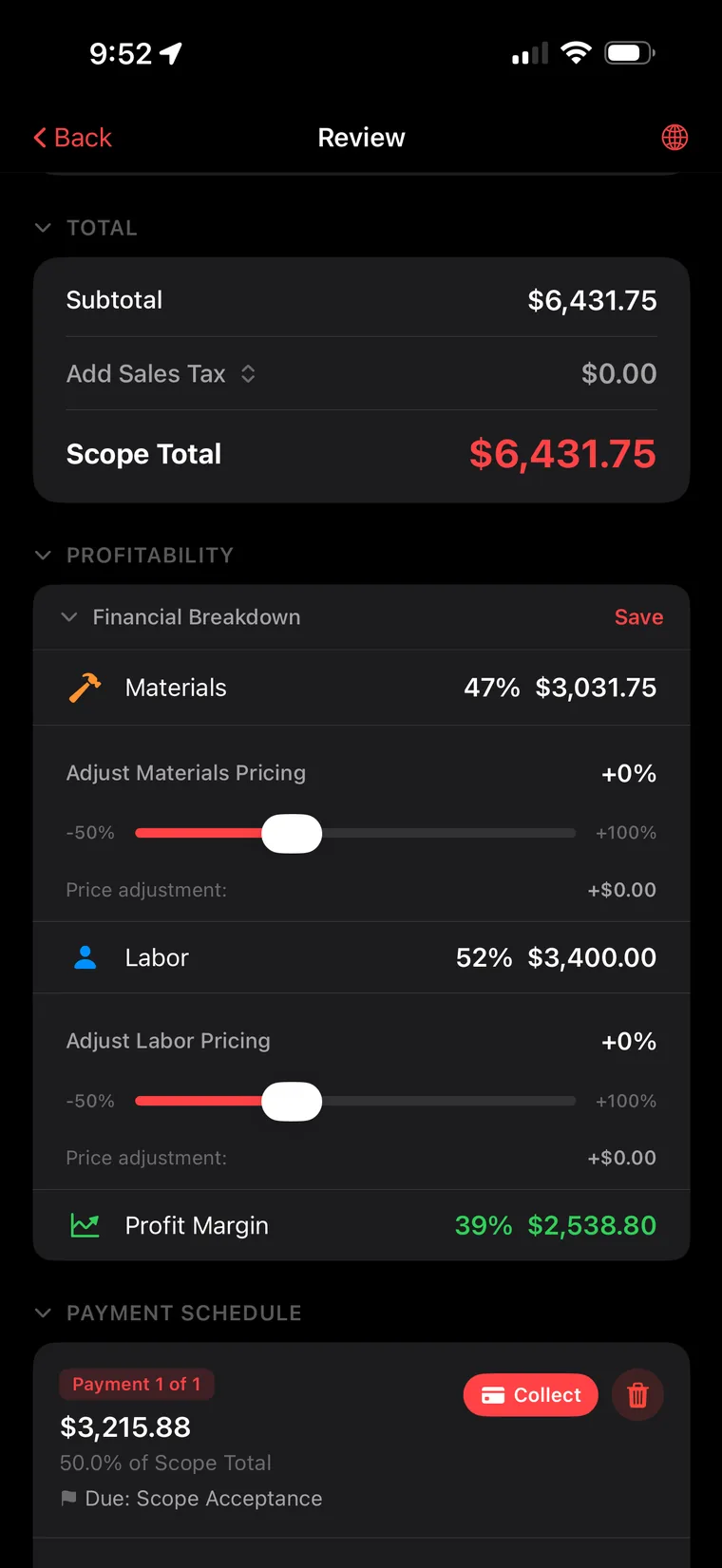
$6,431.75 — with your profit margin already dialed in.
Scope Total: $6,431.75. But Smart Scope shows you what owners actually care about: Materials 47%. Labor 52%. Profit Margin 39% — $2,538.80, in green. Drag the pricing sliders and watch margin respond in real time. Payment schedule set — 50% due at acceptance, Collect button armed. It's 9:52 AM. You walked in at 9:29. That's a signed-ready, margin-checked estimate in 23 minutes — narrated, not typed.
Know your margin before you quote
20
"The estimate got written while you were still standing in the parking lot. That's Site Walk."
Site Walk · Smart Scope
Your next site walk writes itself.
Download Smart Scope, open Site Walk, and start talking. 23 minutes from now you could be handing over a priced, signed, margin-checked estimate — free for 45 days.
✓ Free 45-day trial
✓ No credit card required